
How should I complete the Kewang Professional tax return T2125 template? The 2026 tax return is explained step-by-step.

✅ Final Checklist Before Filing
All income entered (before HST if applicable)
All expenses recorded with receipts
Home office calculation completed
Vehicle log completed and business use % calculated
HST amounts are correctly separated (if applicable)
Totals are accurate and cross-checked

🔁 Key Differences Between the Two Templates
Feature | Without HST / Quick Method | With HST |
Sales | Enter total sales without HST | Enter sales before HST |
Expenses | Enter full cost including tax | Split into Net + HST |
Calculations | Manual totals | Auto-sum formulas for Net + HST |
💡 Tip: If you’re not HST-registered, enter your total sales directly. If you are, enter the amount before HST.
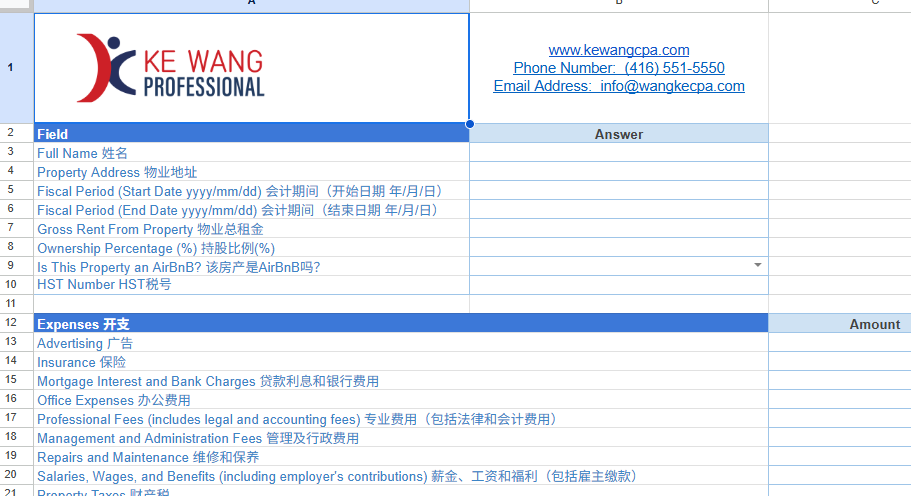
Section 1: Business & Owner Information
Start at the top of the sheet.
Section 2: Cost of Goods Sold (if applicable)
This section is mainly for retail or product-based businesses.
Section 3: Business Expenses
Here’s where you list all allowable business expenses:
Advertising
Meals & Entertainment (only 50% deductible)
Insurance, Bank Charges, Licenses
Office Expenses, Rent, Repairs
Salaries, Travel, Utilities, Phone, Internet, etc.
HST version:
Enter the pre-tax expense in Net
Enter the HST paid in HST
The Total column adds them automatically.
Non-HST version:
Enter the full amount paid (including any tax) in the Answer column.
Section 4: Business Use of Home
If you use part of your home for business, you can claim a portion of home expenses.
First, answer:
Do you use your home for business?
Area used for business / Total home area
Hours per day, Days per week, Weeks per year
Then list home expenses:
Heat, Electricity, Insurance, Maintenance, Mortgage Interest, Property Taxes
Section 5: Motor Vehicle Expenses
If you use a vehicle for business, complete:
Make, Model, Date Acquired
Total km driven in the year
Business km driven in the year
Then list vehicle-related expenses:
Parking, Insurance, Fuel, Tolls, Repairs, Lease, Finance Interest, License

T2125 Tax Return Template Q&A:
Q1: Which template should I use—the one with HST or without HST?
A: Use the HST version if you are registered for HST and need to track input tax credits (ITCs). Use the non-HST version if you are not HST-registered or use the Quick Method for HST. Click here to learn more about Quick Method.
Q2: What if I don’t have a Business Number (BN)?
A: You can leave it blank if you’re a sole proprietor without a BN. If you’re incorporated or have an HST account, you should have a BN.
Q3: How do I find my Industry Code?
A: Visit the CRA website and search for “NAICS codes.” Choose the code that best matches your business activity. The full industry code should be 6 digital numbers.
Q4: What goes into “Gross Sales, Commissions, or Fees (without HST)”?
A: Enter all business income before adding HST. If you’re not HST-registered, enter the total amount you received.
Q5: Do I need to fill out “Cost of Goods Sold” if I’m a service business?
A: No, this section is optional and mainly for retail or manufacturing businesses. Service-based businesses can leave it blank.
Q6: What’s the difference between “Net” and “HST” columns in the HST version?
Net: Enter the actual expense amount before tax.
HST: Enter only the HST portion you paid.The Total column auto-calculates Net + HST.
Q7: Can I claim meals & entertainment at 100%?
A: No, only 50% of eligible meals and entertainment expenses are deductible for tax purposes.
Q8: What if I use my car for both business and personal trips?
A: Track your total kilometers and business kilometers. Only the business percentage of vehicle expenses can be claimed.
Q9: How is “Business Use of Home” calculated?
A: It’s based on the percentage of your home used for business (area and time). The template will guide you through entering your home expenses, and you claim the business portion.
Q10: Do I need receipts for everything?
A: Yes, keep all receipts and invoices for at least 6 years in case the CRA asks for documentation.
Q11: What if I bought equipment like a laptop or printer?
A: Enter it under “Fix assets purchase in tax year.” Depending on the cost, you may need to depreciate it over time (CCA), but for simplicity, many small businesses claim it under current expenses if it’s under $500.
Q12: Why are some cells not adding up?
A: Check if you’re entering numbers in the correct columns. The HST version uses formulas in the Total column—make sure you’re putting numbers in the Net and HST columns, not the Total column.
Q13: Can I edit the formulas?
A: Modifying formulas should be avoided unless you are certain. Please notify us in advance and wait for our approval if you need to make any changes to our template.
Q14: What if I have expenses not listed in the template?
A: You can add them under “Other Costs” in the Cost of Goods Sold section or create a new row in Expenses with a clear label. Always keep supporting documents.
Q15: Is this template CRA-approved?
A: The template is designed to align with CRA’s Form T2125 requirements, but it’s a tool for Kewang professionals to service clients faster and more smoothly. We still need to report the final numbers on your official tax return.

Comments